Folders that make sense
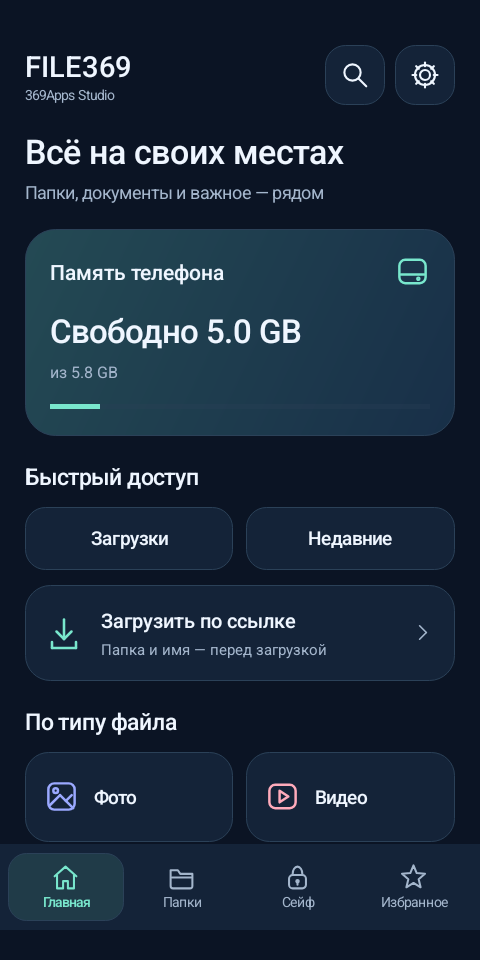
Create folders, search by name or extension, and copy or move several files at once. Sorting files into type-based folders shows you a preview before moving anything.
 FILE369369APPS STUDIO
YOUR FILES, YOUR CONTROL
A file manager for everyday work on Android. Find what you need, put files in order and choose where your next download goes.
1.0.0-preview1 · Android 8+ · 85 KB
Checked on an Android 15 emulator. Testing on your phone is the next step.
EVERYDAY WORK
Create folders, search by name or extension, and copy or move several files at once. Sorting files into type-based folders shows you a preview before moving anything.
A separate password-protected vault encrypts both file contents and names. It locks when you leave the app. You can export an encrypted vault backup.
Open an HTTPS link in FILE369 or send it through Share. Before downloading, choose the folder and filename. You can create a new folder in the same dialog.
Favorites, trash with restore, ZIP creation and extraction. Russian, English and Hebrew; light and dark themes.
GET STARTED
Android 8 or later · APK installation · Free
Download and open the file. If Android requests permission to install from this source, allow it for your chosen browser or file manager.
Launch FILE369 and grant storage access when Android asks. Open a folder, create your own structure or use sorting into type-based folders.
In the Vault tab, choose a password of at least 8 characters. Keep it safe and export an encrypted vault backup to a separate location.
The destination picker works for downloads handled by FILE369 and files or links shared with it. Apps using Android’s system Save As dialog can choose FILE369. The file manager cannot change other apps’ independent downloads.
Adding a file creates an encrypted copy; the original stays outside. Exporting a file creates an unencrypted copy. A forgotten password cannot be recovered. Uninstalling the app deletes the vault, so export an encrypted backup first.
Folders, search, archives and the vault work locally. The internet is used when you choose to download an HTTPS link. FILE369 has no accounts, ads, analytics or server uploads of your files.
Keep FILE369 open until copying, encryption or downloading finishes. Moving the app to the background cancels the current operation; files already completed remain saved.
FILE369 1.0.0-preview1 · studio.apps369.file369
APK SHA-256
d17ff75fa373a2a69f71883d4715ea5ff74f552cfeededcd9ee631a85c923904